Echo Dot Gen 4 Review: Real User Experience After 3 Months
Introduction
I've been living with an Echo Dot Gen 4 for three months now, using it in both my kitchen and living room on different days and routines. I bought it because I wanted a low-cost smart speaker that could handle everyday voice tasks, act as a bedside alarm, and occasionally play music while I cooked. What I found was a compact, surprisingly capable little sphere that improved on a few things from previous Dots — but that doesn't mean it fixed everything.
In this review I’ll walk through how the Echo Dot Gen 4 performed in real, day-to-day scenarios: setup, audio quality, voice recognition, smart home control, privacy and build, and how it held up over three months of regular use. I’ll also share the specific things I liked and the disappointments that mattered to me as an owner. Finally, there’s a comparison table, a short buying guide, and a conclusion summarizing whether it makes sense for different kinds of users.
What I used it for (my typical daily routines)
Here’s how I actually used the Dot during these three months:
- Kitchen companion: timers, weather, quick recipe conversions, and background music while cooking.
- Bedroom alarm: using the routine feature to wake up to brief news flashes and a soft volume increase.
- Smart home control: toggling smart bulbs and checking the status of smart plugs and sensors.
- Casual music playback: podcasts in the morning, playlists when friends are over, and podcasts at night.
- Intercom/Drop In: occasional use to call other Echo devices in the house.
Unboxing and initial setup
Right out of the box I noticed the Echo Dot Gen 4’s spherical design — very different from the puck-shaped Dots of earlier generations. I appreciated how it looks less like "tech" and more like a small decorative object. Setup was straightforward: plug in, open the Alexa app, find device, connect to Wi‑Fi, and follow the short prompts. The whole process took me under 10 minutes the first time.
In my experience the Alexa app is still a mixed bag. It does everything you need, but I found the layout could be less clunky when managing routines and multiple smart devices. I spent extra time organizing groups so I could say "turn off the living room" and have it target the right lights; that's not the speaker's fault, but it's part of the ownership experience.
Design and build quality
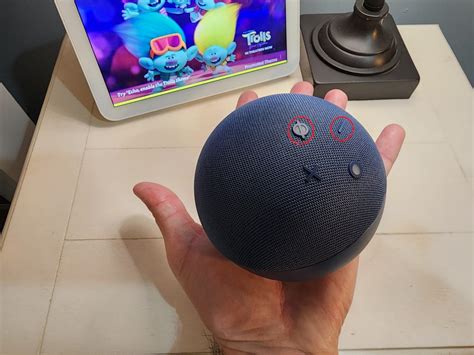
I liked the new look. The fabric finish feels soft to the touch and the sphere design disperses the light ring subtly at the base. The buttons — volume up/down, microphone mute, and action button — are tactile and well-placed on the top. One small annoyance: the fabric collects dust and crumbs in the kitchen if you place it too close to the stove. I had to wipe it down more often than I anticipated.
Size-wise the Dot is compact. It fits neatly on a narrow shelf or countertop, and it doesn’t dominate a room visually. The power adapter is the typical chunky Amazon brick, so you’ll need to think about plug placement if outlets are tight.
Audio quality — the headline improvement (but with limits)
Audio is the biggest improvement for me compared with older Dots I've used. The Gen 4 has fuller mids and a more rounded sound profile, which made voices, podcasts, and vocals clearer than before. I was genuinely surprised by how much better an inexpensive device could sound for spoken word — podcasts sounded nearly as good as my bedroom Bluetooth speaker used to.
That said, the bass is still limited. If you're looking for deep, room-filling low end for dance music or bass-heavy tracks, the Dot won't satisfy you. In my living room the sound is pleasant enough for small gatherings and background music, but when a friend asked me to crank a playlist, I paired the Dot with a proper Bluetooth speaker for better dynamics.
One practical thing I liked: the Dot handles volume changes smoothly and Alexa's voice prompts don't clip even at higher volumes. However, at very low volumes background hiss becomes noticeable if you're used to higher-end audio gear.
Shop the latest Audio & Headphones picks on Amazon.
View Offers →Voice recognition and Alexa responsiveness
After three months I can say the mic performance is quite good in normal conditions. I had the Dot on the kitchen counter while the kettle and range hood were running and Alexa still caught commands most of the time. The array of microphones does an admirable job at distance of several meters in quiet rooms.
That said, it occasionally missed wake words right after noisy appliances or loud music. One memorable morning I had to repeat a timer-stop command because Alexa thought I said something else. That happened maybe once every couple of weeks — not a dealbreaker, but worth noting if you expect flawless recognition in loud environments.
I also used voice profiles so Alexa could tailor responses (e.g., "what's on my calendar?"). Setting up voice profiles works, but in my experience Alexa sometimes needs reminding which voice it recognized, especially when household members have similar voices.
Smart home integration
In my setup I have smart bulbs, plugs, and a few sensors. The Dot integrated with everything via the Alexa app without me having to buy an additional hub. I could say "turn on the kitchen light" and it would reliably toggle the correct bulb. Routines are powerful: I created a bedtime routine that dims lights, reads a short weather summary, and sets an alarm.
If you rely on local Zigbee or Thread mesh features for low-latency device control, note that the Dot Gen 4 does not replace a dedicated hub in every case — complex ecosystems sometimes still benefit from vendor-specific bridges. In my experience, simple on/off and scheduled automations are seamless; advanced integrations occasionally required the device manufacturer's bridge.
Privacy and controls
I'm always conscious of privacy with always‑listening devices. The physical mute button works as expected — when pressed, a red indicator tells you the microphones are off. I appreciated the easy access to voice history in the Alexa app: after some testing I reviewed recent commands and deleted them where necessary. Alexa gives reasonably straightforward controls for managing recordings, but if privacy is a primary concern you’ll still need to be proactive about reviewing settings.
Reliability and software updates
Over three months I received a couple of firmware updates. The Dot rebooted automatically overnight once and everything came back online without intervention. Connectivity to my Wi‑Fi remained stable, though I did experience one flaky day where routines didn't run at scheduled times — a quick router reboot fixed it. In short, reliability is good but not immune to the occasional home network hiccup.
What I liked (specifics)
- Improved audio for its size: noticeably better mids and vocal clarity than previous Dots I’ve owned.
- Compact, attractive design: the spherical shape blends into most rooms more naturally than a puck.
- Fast, easy setup: took under 10 minutes and the device worked with my existing smart bulbs and plugs.
- Useful features: routines, multi-room audio, timers and alarms all did what I needed without fuss.
- Good microphone array: catches commands well across a typical-sized room even with background noise.
What disappointed me (specifics)
- Bass is weak: if you care about punchy low end, the Dot will feel underpowered.
- Fabric attracts kitchen grime: I had to wipe it down more frequently than I expected.
- Alexa app navigation: still somewhat clunky when managing dozens of devices and routines.
- Occasional wake-word misses: rare but noticeable when loud noises immediately precede commands.
Pros & Cons
- Pros:
- Affordable entry to Alexa ecosystem
- Clearer midrange and voice clarity than previous generations
- Compact, modern design that fits many rooms
- Easy smart-home integration for basic automations
- Cons:
- Limited bass and power for music lovers
- Fabric cover needs regular cleaning in some placements
- App and ecosystems quirks remain
Comparison table
| Feature | Echo Dot Gen 4 (this review) | Echo Dot Gen 3 (typical older model) | Google Nest Mini (2nd gen) |
|---|---|---|---|
| Design | Small spherical fabric finish; modern look | Compact puck shape; plastic top | Flat puck with fabric top; minimalist |
| Audio quality | Better mids, clearer voices; limited bass | Thinner mids; less clarity for vocals | Comparable to Gen 3 for voice; bass tight but not deep |
| Smart home | Strong Alexa ecosystem; good device compatibility | Same Alexa features, older sound chip | Solid integration with Google Home devices |
| Mic performance | Good in most conditions; handles background noise well | Good, but less sensitive at distance | Good; often slightly better in very noisy rooms |
| Aux out / Bluetooth | 3.5 mm line out and Bluetooth support | 3.5 mm line out and Bluetooth support | Bluetooth limited; no line out |
| Who it's for | Casual listeners, Alexa users, smart-home starters | Budget buyers who value basic Alexa features | Users invested in Google services and assistants |
Buying guide — what to check before you buy
In my experience the Echo Dot Gen 4 is a practical buy for many households, but here are the questions I asked myself and the steps I recommend you take before adding one to your cart:
1. What will you use it for?
If you want a bedside alarm, voice assistant for timers and simple smart-home control, or a convenient way to listen to podcasts, the Dot is a solid fit. If you want high-fidelity music playback, consider pairing the Dot with a Bluetooth speaker or looking at larger Echo models designed for audio.
Looking for the best Audio & Headphones deals on Amazon?
Browse Now →2. Do you have an existing smart-home ecosystem?
I connected bulbs, plugs, and a few sensors without buying extra hubs. However, if you depend on advanced Zigbee or Thread features for your home automation, check whether the specific Echo model you consider supports them or whether a separate hub is needed.
3. Placement matters
Place the Dot away from direct heat and grease (especially in the kitchen) to avoid fabric buildup. For better voice capture, put it on a counter or shelf rather than inside a cabinet. I found it worked best about 1–2 meters from where I usually stood.
4. Think about privacy
Decide whether you're comfortable with a voice assistant listening for wake words. Use the mute button, voice history controls, and other privacy settings if you want more control. I reviewed my voice history a few times and adjusted settings to delete recordings automatically after a set period.
5. Check for deals and bundles
I found that occasional sales bundle the Dot with smart bulbs or a clock version. If you want display of the time at a glance, consider the clock edition. If you want better sound, look for bundle options that include a compact Bluetooth speaker you can pair with the Dot.
6. Accessories and power
Make sure you have a convenient outlet. If you want to wall-mount the Dot or tuck it into a small shelf, factor in the adapter size and cable routing. I used a short extension for a tidy cord run behind a shelf.
Final thoughts and conclusion
After three months with the Echo Dot Gen 4, I feel comfortable recommending it as a smart, inexpensive entry into Alexa’s ecosystem. In my experience it hits the sweet spot for voice tasks, smart-home controls, and spoken-word audio like podcasts. The design is better suited to visible placement in a living area compared with older Dots, and the mic/voice performance is quite reliable for everyday use.
However, it's not perfect. The bass is weak if your main priority is music, the fabric finish needs cleaning depending on placement, and the Alexa app can feel clumsy when managing many devices. Those trade-offs are worth considering: if you want an all-in-one music-first device, look at larger Echo models or dedicated speakers. If you want a compact, attractive assistant that handles alarms, timers, smart switches, and everyday queries well, the Dot Gen 4 does its job and does it without fuss.
For me, the Echo Dot Gen 4 became part of the daily routine quickly. I enjoy asking it to set timers while cooking, to play a short news briefing in the morning, and to dim the lights in the evening. Those practical conveniences mattered more to me than perfect audio reproduction. If you live in a similar space and want an affordable, well-rounded smart speaker, this model is worth considering — just be realistic about its audio limits and maintenance needs.