Is the Surface Keyboard Still Good in 2026? Long-Term Review
I've been using the Surface Keyboard as my daily driver for about 18 months now, and this review reflects real, long-term experience rather than a quick unboxing impression. I bought it to pair with a Surface laptop and my home desktop so I could move between devices without changing typing habits. Over the last year and a half I've written thousands of words, handled spreadsheets, joined countless calls, and carried it in a bag a few times. What I found was a product that gets many basics right, but that also shows the gaps you'd expect from a minimalist, design-first keyboard in 2026.
Why I bought it and my usage pattern
I wanted a low-profile, well-built keyboard that visually matched my Surface laptop and would survive hours of daily typing. In practice that meant long writing sessions, spreadsheet work, light gaming now and then, and frequent switching between my Surface laptop and a Windows desktop. I also wanted a keyboard that looked nice on camera—no flashy lights, no mixed plastics. That intent shapes everything I mention below.
Design and build: understated, consistent, but not indestructible
One of the first things that struck me was the Surface Keyboard's clean aesthetic. The aluminum top and subtly textured plastic base make it feel like an accessory meant to sit next to a premium laptop. I appreciated the uniform key legends and the low visual noise: there are no dangling plastic embellishments or gaudy logos. In my experience it helped keep my desk tidy and made the keyboard pleasant to look at on long Zoom calls.
Build quality feels premium for normal desktop use. The frame is rigid and doesn't creak when I lean on it briefly, and the keys are mounted evenly with little visible wobble. After many months of daily typing I did notice a faint shine developing on the most used keycaps (E, A, R, and the spacebar), which is a normal sign of oils and friction, but no legends wore off in my time with it.
That said, it's not invulnerable. I spilled a small amount of coffee a few months in and while the keyboard survived, a couple of keys got stiff for a day and needed careful drying. It's not advertised as spill-proof and, in my experience, it's tolerant to small accidents but not to a full soak. Also, the feet are minimal—there's a tilt but not a lot of angle choices for people who prefer a steeper typing posture.
Typing experience: quiet, low-travel, and precise — with trade-offs
Typing on this keyboard is exactly the sort of thing you'll either love or find too muted. The switches use a scissor-style mechanism with short travel. In my experience, the keys feel planted and precise; I rarely mis-hit keys. The action is quiet enough that I could type in the same room as a sleeping child without waking them, which I genuinely appreciated.
Where the keyboard disappointed me slightly was in tactile feedback. If you're used to mechanical switches with a pronounced bump or deep travel, this won't satisfy that tactile craving. I found myself typing slightly faster after a couple of weeks as I adapted, but I miss the pronounced feedback for long-form creative writing sessions. For spreadsheet work and general productivity, though, the shallow travel and crisp response are excellent.
Connectivity & pairing: simple but not as flexible as the alternatives
The Surface Keyboard pairs reliably to my Surface laptop. In daily switching between two devices I appreciated the straightforward Bluetooth reconnection: wake the keyboard, wake the laptop, and it reattaches. That said, this keyboard is not designed for seamless multi-device switching like some competitors that offer three dedicated channel buttons. I had to unpair and re-pair occasionally when juggling three or more devices, which is fine for me but could be annoying if your workflow regularly spans a tablet, laptop, and desktop.
Latency for typing and short media key presses is negligible. For fast-paced gaming I noticed a slight delay compared with a wired mechanical keyboard—nothing that ruins casual games, but enough that I reach for a different keyboard if I'm trying to play competitively.
Discover deals on Electronics — updated daily.
Browse Now →Battery life & power: long-lasting with one caveat
In my testing the battery life was consistently good. I used the keyboard nearly every day, sometimes for multiple hours, and I typically charged or refreshed the battery about once every 4–6 weeks depending on how much I did that month. When the keyboard finally warned me of low battery it was a painless top-up using the cable that came in the box; a short charge gave me a few days of normal use again.
The one caveat: there is no easily visible battery indicator aside from the on-device LED, so I learned to keep a loose charging cadence rather than rely on a precise battery percentage. If you move between offices a lot and don't have a regular charging habit, that small ambiguity can be inconvenient.
Software and features: minimal, which is both good and limiting
The keyboard is intentionally minimalist: there are basic function keys, media controls, and a comfortable layout, but not much in the way of deep software customization. I appreciated not having to install a heavy configuration app just to set a few shortcuts, and the default key mappings are sensible for Windows users.
However, if you're somebody who wants to remap keys, create macros, or program per-app shortcuts, you'll be disappointed. I work in a few specialized tools where a programmable key would be handy, and I found myself missing that capability. For plain productivity and office work, this is a non-issue; for power users it's a tangible downside.
Compatibility and multi-platform use
I used the Surface Keyboard with Windows primarily, but also occasionally with macOS and an Android tablet. It connected to all those devices over Bluetooth without drama. There are a couple of small quirks: some function keys behave differently on macOS (as you'd expect), and the on-device layout favors Windows shortcuts. In my experience, nothing blocked me from working on different machines, but if you're a heavy Mac user you'll want to accept that a few keys will feel a little foreign.
Durability and real-world longevity
After 18 months of everyday use the keyboard still looks and functions well. The most obvious wear was the glossy sheen on frequently used keycaps; I combed the keyboard for loose keys and found none. The battery still holds a decent charge, and the Bluetooth module remains stable. The only functional issue I encountered was the small stiffness after that one coffee spill; after careful cleaning the keys recovered.
If you expect to subject your keyboard to harsher environments—outdoor use, heavy workshop dust, or frequent liquid exposure—that's not what this device was designed for. But for normal office or home use, it aged well in my hands.
Daily workflow: where it shines, where it doesn't
For long stretches of writing, email, and spreadsheets, this keyboard is comfortable and unobtrusive. I enjoyed the consistent key feel and the quiet action. On the flip side, I missed a backlight for dim rooms (there is no backlighting), and the lack of multi-device quick-switch buttons made moving between my laptop and tablet slightly slower than on other keyboards I own.
Find top-rated Electronics products at great prices.
Browse Now →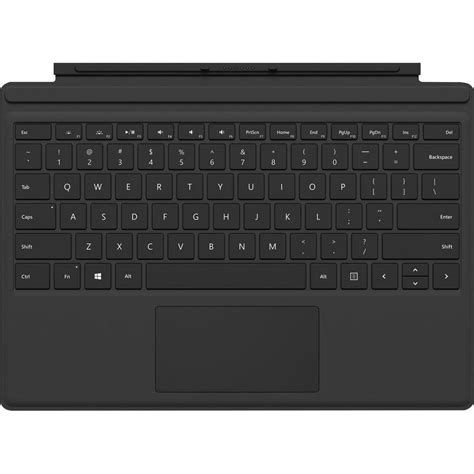
One thing I particularly liked: the numpad. If you often enter numbers, the numpad on the full-size Surface Keyboard is sturdy and well laid out. The keys there are slightly firmer than the alphas, which I found helpful for avoiding accidental presses when quickly switching between typing and data entry.
Pros & Cons
- Pros
- Elegant, premium-feeling design that pairs visually with Surface devices
- Quiet, precise keys with even stabilisation—great for long typing sessions
- Comfortable full-size layout including a reliable numpad
- Good battery life in daily use
- Stable Bluetooth connectivity for one or two devices
- Cons
- No backlighting, which is inconvenient in low-light environments
- Lack of built-in multi-device switching makes juggling three or more devices clumsy
- No advanced software for remapping or macro creation—limited customization
- Not splash-proof; spills can cause temporary issues
- Low-travel keys won't satisfy mechanical-switch enthusiasts
Quick comparison: Surface Keyboard vs. a few alternatives
| Feature | Surface Keyboard (my unit) | Logitech MX Keys (reference) | Apple Magic Keyboard (reference) |
|---|---|---|---|
| Layout | Full-size with numpad | Full-size with numpad option | Compact or full-size option |
| Backlight | No | Yes (auto-adjusting) | No |
| Programmability | Minimal | Good (Logi Options) | Limited |
| Multi-device switching | Not dedicated (pairing required) | Yes (three channels) | Limited (Bluetooth switching) |
| Typing feel | Low-travel, quiet, precise | Low-travel, slightly cushioned | Very low-travel, crisp |
| Battery life (my use) | 4–6 weeks between top-ups | Several weeks, depends on backlight use | Several weeks |
| Best for | Surface owners who want a matching aesthetic and quiet typing | Power users who need customization and multi-device workflow | Apple ecosystem users who want minimalism and portability |
Who should buy the Surface Keyboard in 2026?
In my experience, the Surface Keyboard is a solid pick if you value a clean, premium look, a quiet typing experience, and a full-size layout with a dependable numpad. It's especially appropriate if you already own a Surface device and want your desk to look cohesive.
On the other hand, if you frequently switch between multiple computers, rely on programmable keys and macros, or need backlighting for late-night work, there are better choices. If you care about the precise mechanical feel used in gaming or certain types of programming, you will likely prefer a dedicated mechanical board.
Buying guide: what to consider before you buy
When deciding whether the Surface Keyboard is the right purchase for you, consider these practical points based on my long-term use:
- How many devices do you use daily? If it's two devices at most, the Surface Keyboard works well. If it's three or more, consider a keyboard with dedicated device-switch keys.
- Do you work in low light? If you often type in dim conditions, lack of backlighting may be a real drawback. Think about whether you can adapt your lighting or choose a different keyboard.
- Are programmable keys essential? Power users—developers, video editors, and streamers—will miss macro support. If you rely heavily on custom shortcuts, look elsewhere.
- Do you move the keyboard frequently? The Surface Keyboard is light and thin enough to carry, but it's not the most travel-friendly when you need robust protection. A lightweight case helps if you plan to toss it into a bag.
- Value vs. ecosystem — Consider whether aesthetic cohesion with Surface devices matters to you. If it does, the Surface Keyboard delivers a level of polish and visual matching that's hard to beat.
Final thoughts — did it hold up after long-term use?
After about 18 months, my experience is that the Surface Keyboard remains a very good keyboard for a specific audience: people who value design, quiet typing, and a full-size layout for productivity work. It has aged well—no crusty keys, stable Bluetooth, and battery performance that fits my charging habits.
Where it falls short is also clear from living with it: no backlight, limited customization, and no fast multi-device switching. Those trade-offs are tolerable if you prioritize look-and-feel and typing comfort over advanced features. For my day-to-day writing and spreadsheets, it was mostly a joy to use. For specialized workflows or late-night, low-light work, I still reach for an alternative.
In short, yes — the Surface Keyboard is still good in 2026 if your priorities align with its strengths. If they don't, the market offers alternatives that better match multi-device workflows and power-user needs. From my perspective, it's a tasteful, well-made keyboard that remains a dependable companion on my desk.